Picture quality.
Set how sharp and smooth the picture is during a session, without reconnecting.
Image quality: presets (Saver to Maximum), frame rate 15–240 FPS (above 120 FPS needs a host monitor that supports it), resolution, and codec (AV1 / VP9 / VP8 / H.265 / H.264).
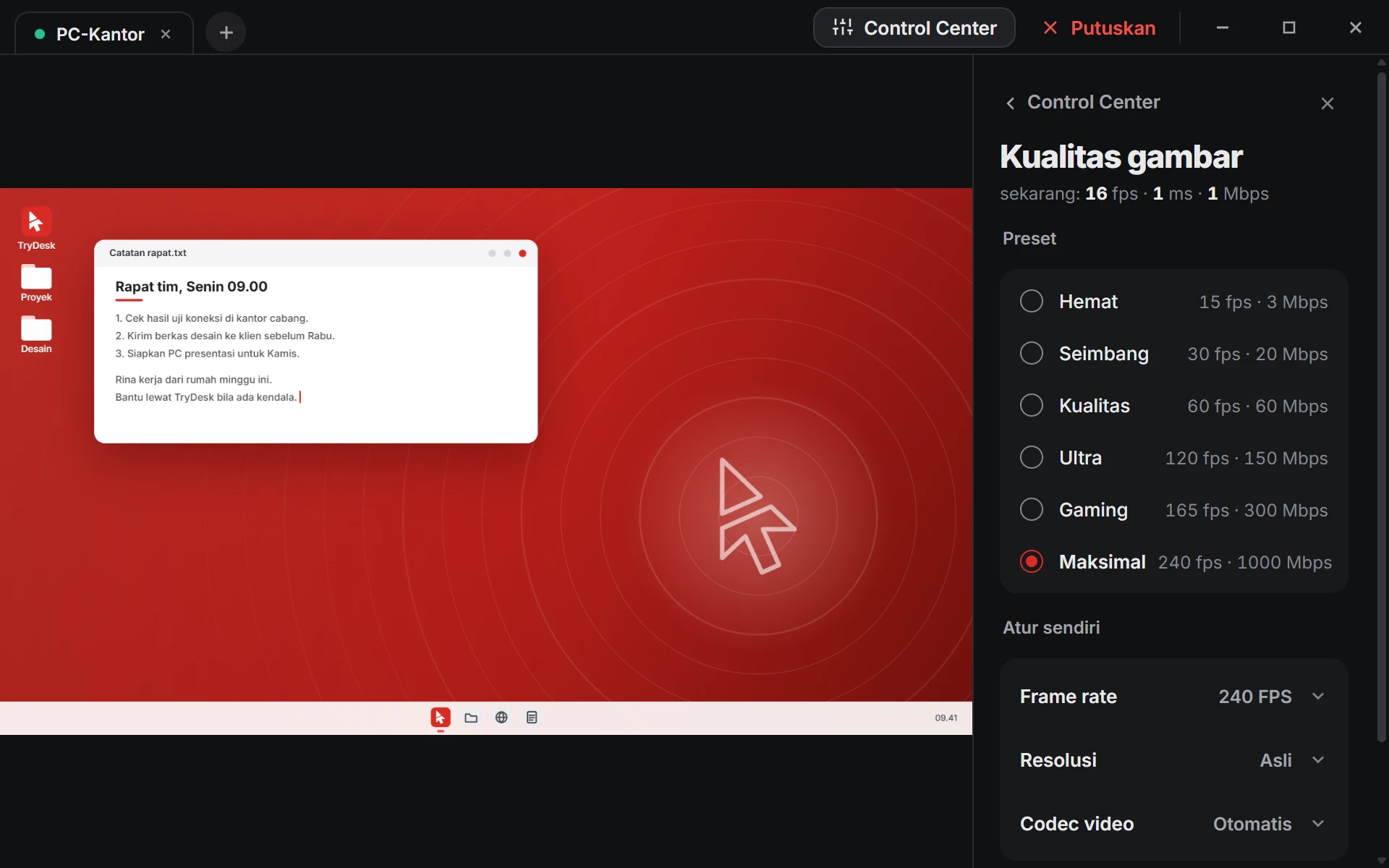
Quality changes take effect instantly, without reconnecting.
Default quality
The quality every session starts with is picked in Settings › Picture quality. Each choice says what it suits. Since 1.4.0 the default is 1000 Mbps and 240 FPS (it used to be 80 Mbps and 60 FPS), so the fast path is used without changing any setting.
| Choice | Speed and FPS | Suits |
|---|---|---|
| Default | 1000 Mbps · 240 FPS | The starting choice, fits most PCs |
| Saver | 3 Mbps · 15 FPS · 720p | Slow internet or a limited data plan |
| Balanced | 20 Mbps · 30 FPS | Ordinary home Wi-Fi |
| Quality | 60 Mbps · 60 FPS | Sharper text and pictures |
| Ultra | 150 Mbps · 120 FPS | A fast wired network |
| Gaming | 300 Mbps · 165 FPS | Gaming, a 165 Hz monitor |
| Maximum | 1000 Mbps · 240 FPS | The same local network, a 240 Hz monitor |
Speeds above 300 Mbps are only used on the fast path: Windows to Windows on the same local network.
On a slow connection
Since 1.3.9, on a slow or unsteady connection TryDesk lowers the fps first and keeps the resolution, so text stays readable. A short signal loss does not end the session: the screen says Connection stalled, reconnecting… while the path is restored.
Codec: H.265 and H.264
When the codec is set to Automatic, TryDesk picks it for you.
- Over the internet: H.265 is used when the controlling PC can play it with its graphics card and the controlled PC can make it. If either one can't, the session uses H.264.
- On the fast path (local network): Automatic stays on H.264, because on this path H.265 is not sharper for text. If you pick H.265 yourself, TryDesk uses the graphics card's H.265 encoder, or falls back to H.264 when the card has none. The session stats then show H.265 · fast path.
- Automatic guard: if H.265 pictures arrive but can't be played, the session switches to H.264 in about 1 second without losing the picture, and that PC is remembered.
- Devices: Automatic uses H.265 for Windows controllers. On Mac and Linux, H.265 can be picked by hand. On Android phones the H.265 option is not shown yet.
- The H.265 (sharper) option is in Settings › Picture quality › Video format and in Control Center › Picture quality › Codec. It is greyed out on PCs that can't play it.
Measured on 14 Nov 2026 over WebRTC (3 runs per version): on a local network, text sharpness rose from 40.1 to 42.3 dB and colored code from 43.2 to 47.6 dB, with practically the same delay.
Related pages
Something wrong or unclear on this page? Email [email protected].